What is OS spoofing for proxies? OS spoofing, also called TCP fingerprint spoofing, changes the TCP/IP fingerprint of a proxy connection so it looks like it came from the operating system you choose, such as Windows, macOS, iOS or Android, instead of the Linux server the proxy actually runs on. It keeps the network layer of your request consistent with the browser and device your bot claims to be.
You can run clean IPs, a good User-Agent and a well-tuned bot and still get soft-blocked on Target or Best Buy. One reason almost nobody checks is the OS your connection reveals before a single byte of HTTP is sent. OS spoofing fixes that layer, and SerpProxies now lets you pick the OS on most plans straight from the dashboard.
This guide explains what OS fingerprinting is, why a proxy usually breaks it, how OS spoofing works on SerpProxies, where it helps on high-security retail sites, and how to check your TCP fingerprint yourself. It also covers what it does not fix, because OS spoofing is one consistency signal, not a bypass.
What is a TCP/IP OS fingerprint?
A TCP/IP OS fingerprint is the set of values an operating system writes into the first packet of every connection. The browser does not control them. The kernel does. Tools like p0f have read them for years to guess, passively and without sending anything back, which OS opened the connection.
The fields that give the OS away sit in the TCP SYN packet, the very first packet your connection sends:
- Initial TTL (time to live). Windows starts at 128. Linux, Android, macOS and iOS start at 64. The site sees the TTL after a few hops, rounds it up to the nearest common start value, and knows which family you are.
- TCP window size and window scaling. Each OS picks its own defaults.
- MSS (maximum segment size). Usually shaped by the network, but part of the pattern.
- TCP options and their order. Windows, for example, does not send TCP timestamps by default, while Linux and Apple systems do. The order of the options is close to a signature on its own.
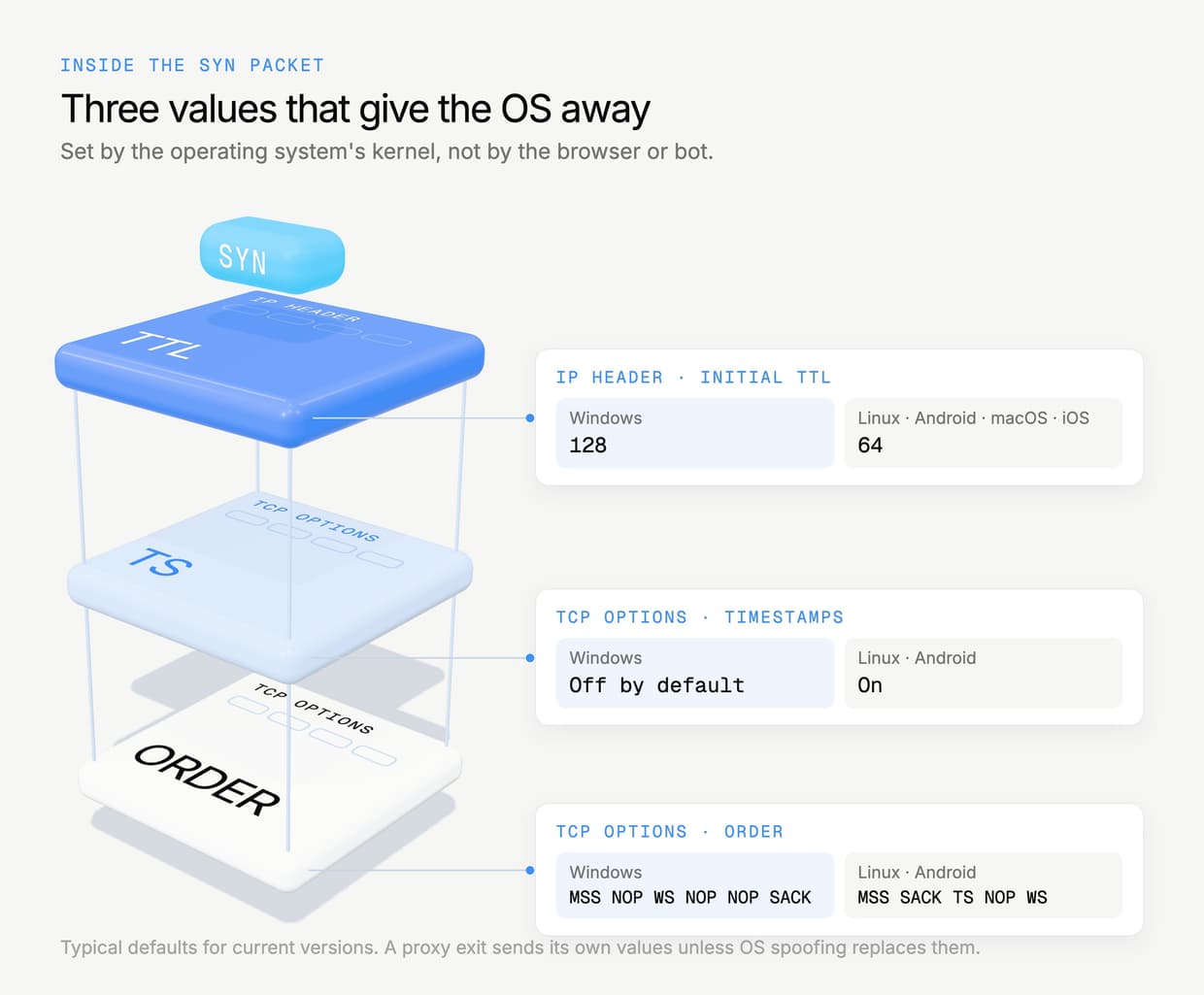
Put together, those values identify the OS family with high confidence from one packet. That makes them useful to anyone checking whether a visitor is who it says it is.
Why the fingerprint has to match everything else
Modern anti-bot systems score consistency across layers. The User-Agent says one thing, the Client Hints say another, the TLS handshake says a third, the JavaScript environment says a fourth. A real Windows Chrome user is consistent on every layer. A bot is often consistent on most of them and wrong on one.
The TCP/IP fingerprint is one of those layers. A request claiming to be Chrome on Windows that arrives with a Linux network signature is a contradiction. On its own it rarely gets you blocked, since some real users sit behind Linux routers and corporate gateways. Stacked with other weak signals on a protected checkout, it can be what tips your session from "allowed" to "challenge" or a silent soft-block.
Why do proxies break your OS fingerprint?
A proxy replaces your IP address, but it also replaces your TCP connection. The site never sees the packet your PC sent. It sees the packet the proxy's exit node sent, and that packet carries the exit node's OS fingerprint.
Almost every proxy exit, datacenter, ISP and most residential gateways included, runs on Linux. So the default result looks like this:
- Your bot sends a Windows Chrome User-Agent.
- Your TLS fingerprint looks like Chrome.
- Your connection arrives with TTL 64, Linux TCP options and Linux window settings.
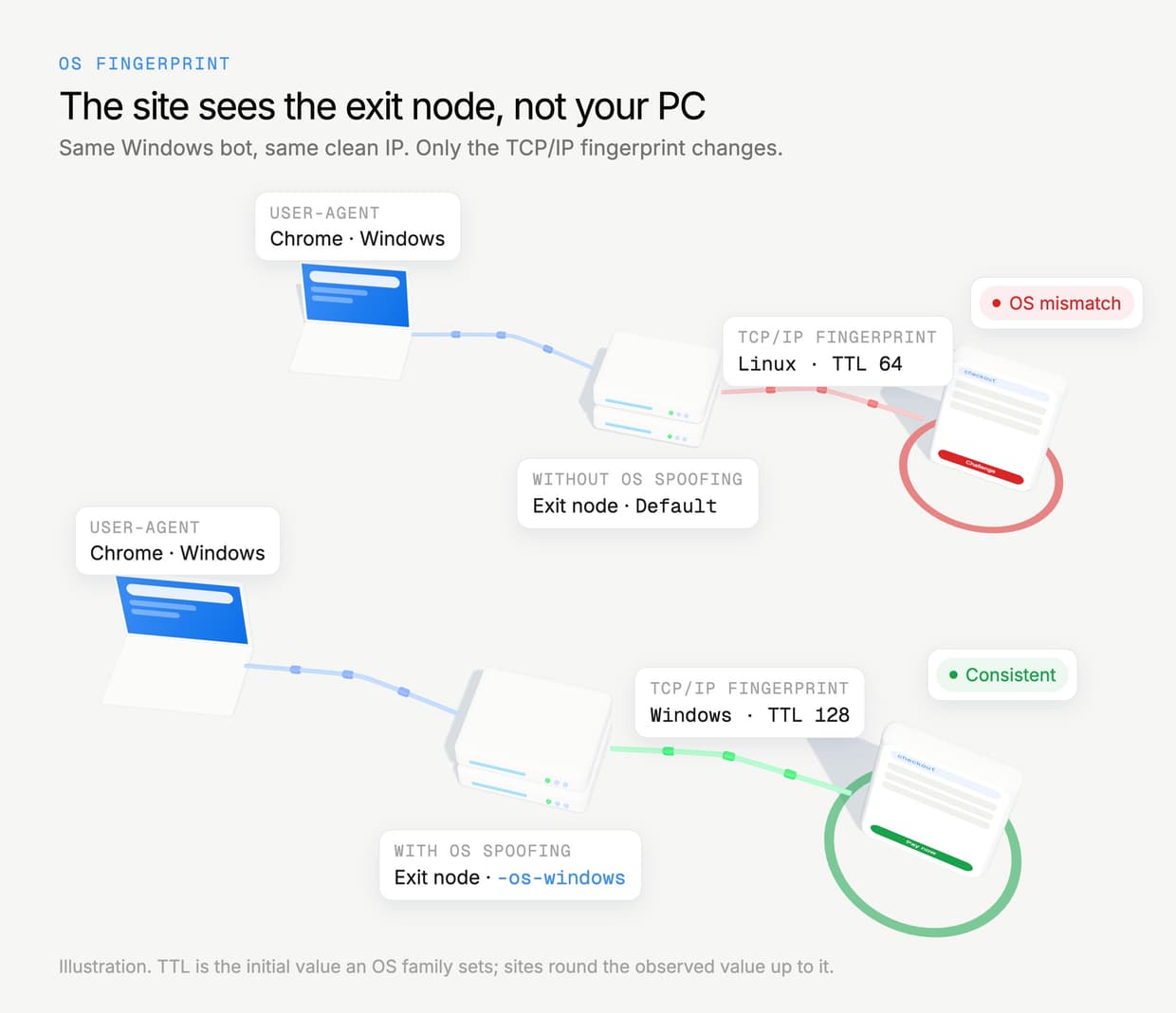
The IP can be perfectly clean and still deliver a mismatch on every single request. Rotating to a new IP does not help, because every exit in the pool has the same Linux stack. This is the part of proxy quality that IP reputation checks never show you.
Mobile and app traffic make it more obvious
The gap is widest when you emulate a phone. A request posing as a retailer's iOS app should come from an Apple network stack. A Linux fingerprint behind an iPhone User-Agent is an easy mismatch to spot, and it is exactly the kind of traffic that high-demand drops attract.
How does OS spoofing work on SerpProxies?
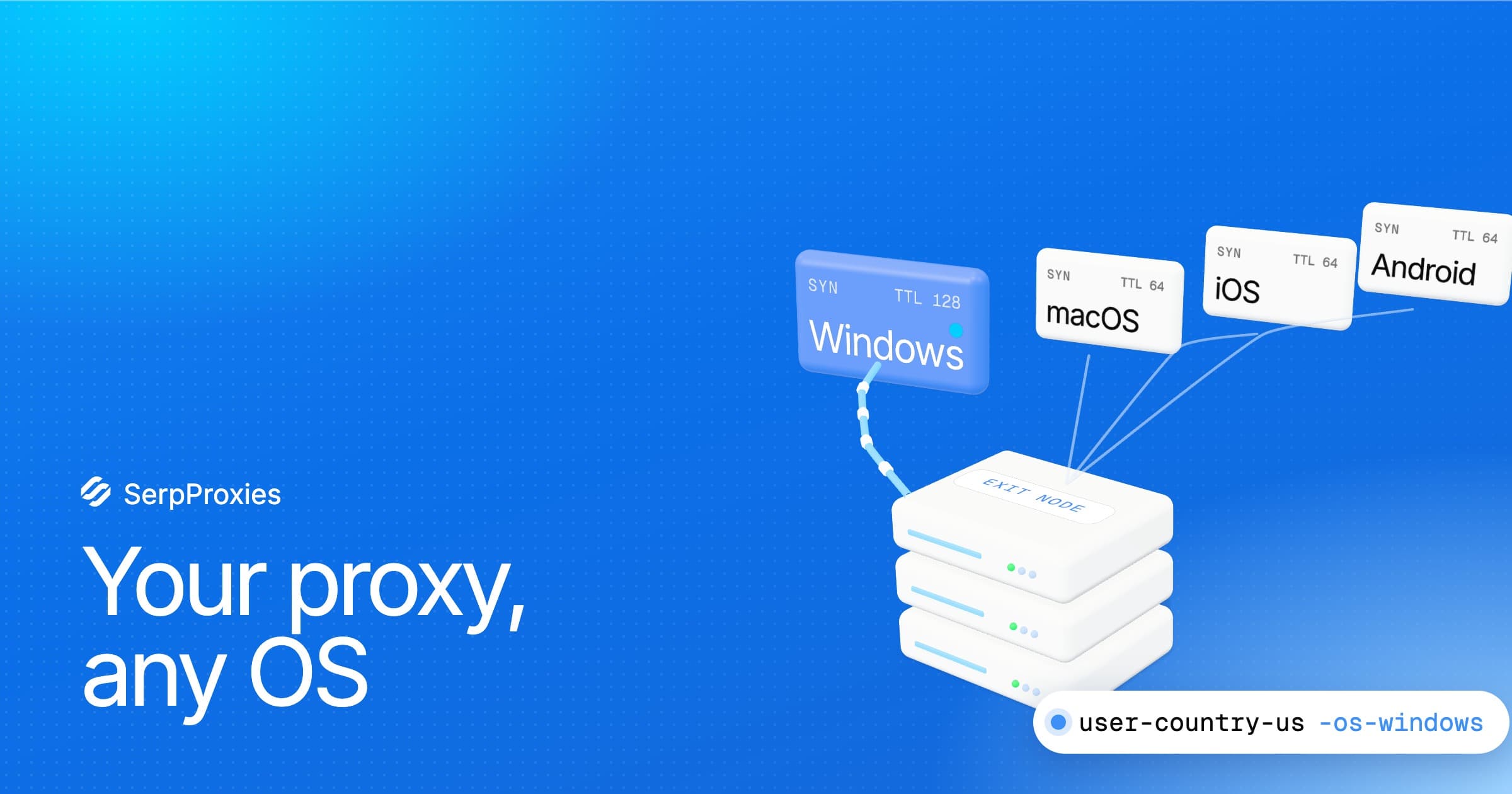
OS spoofing on SerpProxies rewrites the TCP/IP fingerprint at the exit node, so the site receives a SYN packet that matches the OS you picked: Windows, macOS, iOS or Android. Your IP, session and targeting stay the same. Only the network signature changes.
You turn it on from the dashboard:
- Open the Generator and select your plan.
- Pick a value in the OS fingerprint dropdown. Default leaves the exit's own fingerprint untouched.
- Generate your proxy list as usual. The OS choice rides on each line as a username flag, for example
-os-windowsat the end of the username, so it works in any bot that acceptshost:port:user:pass.
Because the flag lives in the username, you can mix fingerprints in one task list: a set of Windows lines for browser-mode tasks and a set of iOS lines for app-mode tasks, all on the same plan.
Which SerpProxies plans include OS spoofing?
OS spoofing is included at no extra cost on these plans:
- Private Residential, with country, state and city targeting.
- Mobile, where an Apple or Android fingerprint matters most.
- Datacenter and IPv6 Datacenter.
- IPv6 Residential.
- Static ISP, on eligible plans. Supported ISP plans show an OS fingerprint picker above your list of dedicated IPs.
If you do not see the OS fingerprint dropdown in the Generator for a plan, that plan does not support it yet. One detail on Private Residential and Mobile: when you pick iOS together with a country, the line goes out as macOS. Both run the same Apple network stack, and fingerprint classifiers read them as the same family.
Where does OS spoofing help on retail sites?
OS spoofing helps most on sites that already pass your IP but still challenge or quietly fail your sessions. Big retail drops sit behind enterprise bot management from vendors like Akamai, DataDome, Kasada, HUMAN (PerimeterX) and Cloudflare, and those systems score many signals together. Removing one contradiction lowers your risk score on every request.
Retail drops: Target, Best Buy, Walmart and Pokémon Center
Retail checkouts are long, stateful sessions. You log in, add to cart, hold a queue position and pay, often over 10 to 25 minutes. Every request in that session carries your network fingerprint. A mismatch that is only a small penalty on one request gets scored again on every page load, cart update and payment call.
Practical setups that benefit:
- Browser-based bots and anti-detect browsers on Windows. Set the OS to Windows so the network layer matches the Windows Chrome profile your bot presents.
- Request-mode tasks that copy a desktop browser. Match the OS to whatever User-Agent your bot sends. If it sends macOS Safari, pick macOS.
- Account warming. If you warm accounts before a drop, keep the same OS on the same account every time. A login history that flips between Windows and Linux is a pattern. Our guide to proxy account warming covers the rest of that routine.
For Pokémon Center specifically, OS spoofing pairs well with the static setup in ISP vs residential proxies for Pokémon Center drops. A static ISP IP that holds the whole queue and also reports the right OS is about as consistent as a proxied session gets.
What about ticket sites?
Ticketing is different from retail. In the US, the BOTS Act makes it illegal to get around a ticket seller's security measures or purchase limits, and the FTC enforces it. Ticketmaster's terms also forbid bots. We don't support using SerpProxies, OS spoofing included, to beat ticket queues, Verified Fan checks or ticket limits.
Lawful ticket-related work is fine: monitoring prices and availability, checking what an event page shows in another region, or testing your own ticketing systems. For those jobs a consistent fingerprint simply keeps your monitors from being mistaken for something they're not.
What OS spoofing does not fix
OS spoofing fixes the TCP/IP layer, nothing more. It does not change your IP reputation, your TLS fingerprint (JA3 or JA4), your HTTP/2 settings or your browser's JavaScript environment. Those still come from your bot or browser.
- A burned IP is still burned. If the address is flagged, the right OS will not save it. See burned proxies and why cheap shared pools fail on drop day.
- A wrong OS is worse than none. Picking Windows behind a macOS User-Agent creates a new mismatch. When unsure, leave it on Default.
- Your bot's TLS has to match too. A Windows TCP fingerprint with a TLS handshake from a Python library is still inconsistent. Use a bot or browser that sends a real browser's TLS fingerprint.
Think of OS spoofing as removing one reason to distrust you. Clean IPs from a private pool, a realistic browser fingerprint and a matching OS together are what keep a session trusted from queue to checkout.
How to choose the right OS setting
Match the OS to the device your bot claims to be. Read the User-Agent your bot sends, or the device profile in your anti-detect browser, and pick the same family.
- Windows Chrome, Edge or Firefox profile: Windows.
- Mac Safari or Chrome profile: macOS.
- iPhone app or Mobile Safari: iOS (sent as macOS when you also target a country on Private Residential or Mobile).
- Android app or Chrome on Android: Android.
- No fixed device, or you are not sure: Default.
How do you check your TCP fingerprint?
Run a TCP fingerprint test through the proxy. A passive fingerprint checker reads the SYN packet your connection sends and tells you which OS it looks like. If it reports the OS you picked in the Generator, OS spoofing is working. If it reports Linux on a Windows setting, check the line you loaded.
- Set the proxy. Load one generated line into the browser or bot profile you want to test, not into your whole system.
- Open a TCP/IP fingerprint test page. Search for a TCP fingerprint checker. The useful ones are p0f-based and show the detected OS next to the OS your browser claims.
- Compare the two. The detected OS should match your User-Agent. A Windows User-Agent with a detected Windows stack is consistent. A Windows User-Agent with Linux detected is the mismatch this guide is about.
- Test before the drop. Check one line from each OS group you plan to run, not every line, and do it before the release, not during it.
Also check the IP itself with the SerpProxies proxy checker, so you know the address is live and in the right country before you look at the fingerprint.
Key Takeaways
- Every connection reveals its operating system through TCP/IP values like TTL, window size and TCP option order, before any HTTP is sent.
- Proxies normally show the exit node's Linux fingerprint, so a Windows or iPhone User-Agent arrives with a mismatched network layer.
- SerpProxies OS spoofing makes the exit look like Windows, macOS, iOS or Android, set per line from the dashboard Generator.
- It is included on Private Residential, Mobile, Datacenter, IPv6 Datacenter, IPv6 Residential and eligible Static ISP plans.
- It helps most on long, protected sessions such as retail checkouts, where every request is scored for consistency.
- It does not fix burned IPs or a non-browser TLS fingerprint, and a wrong OS is worse than Default.
FAQ
What is OS spoofing on a proxy?
OS spoofing changes the TCP/IP fingerprint a proxy connection carries, so the site sees the operating system you picked instead of the Linux server the proxy runs on. On SerpProxies you choose Windows, macOS, iOS or Android in the Generator, and the choice is added to each proxy line.
Does OS spoofing help with retail bots?
It removes one common mismatch between your User-Agent and your network fingerprint, which lowers your risk score on sites that check consistency across layers. It works best combined with clean IPs, sticky sessions and a bot that sends a real browser TLS fingerprint. It is not a bypass on its own.
Which SerpProxies plans support OS spoofing?
Private Residential, Mobile, Datacenter, IPv6 Datacenter and IPv6 Residential, plus eligible Static ISP plans, which show the picker above their IP list. If the OS fingerprint dropdown is missing for a plan in the Generator, that plan does not support it yet.
Does OS spoofing cost extra?
No. It is included on every plan that supports it, and it does not use extra bandwidth.
Which OS should I pick?
Pick the OS your bot or browser profile claims to be. Windows for Windows browser profiles, macOS for Mac, iOS or Android for app emulation. If you are not sure, leave it on Default, because a wrong OS creates a new mismatch.
Why does iOS show as macOS on some lines?
On Private Residential and Mobile, an iOS pick combined with a country target goes out as macOS. Both share Apple's network stack, so fingerprint classifiers read them as the same family. Without a country, iOS is sent as iOS.
Can I use OS spoofing for ticket bots?
Not to get around ticket limits or queues. In the US the BOTS Act makes circumventing a ticket seller's security or purchase limits illegal, and Ticketmaster's terms forbid bots. OS spoofing is fine for lawful work such as price monitoring or regional checks.
How do I test my TCP fingerprint?
Load one proxy line into a browser profile and open a p0f-based TCP fingerprint checker. It shows the OS your connection looks like. If it matches the OS you picked in the Generator and your User-Agent, the setup is consistent.
Does OS spoofing change my TLS or browser fingerprint?
No. It only changes the TCP/IP layer. Your TLS handshake, HTTP/2 settings and browser fingerprint still come from your bot or anti-detect browser, so set those to match the same OS.
OS spoofing for proxies closes a gap most setups never check. If your retail tasks pass the IP check but still get challenged, TCP fingerprint spoofing is the next thing to fix: set the OS fingerprint to match your bot in the SerpProxies Generator and run your next drop with a connection that is consistent all the way down.