Browser automation usually has two separate problems to solve: where the traffic comes from, and what happens when the target puts a challenge in front of it. SerpProxies handles the first. CaptchaAI handles the second. This guide wires them together for a reCAPTCHA v2 flow in Playwright and in Scrapy via scrapy-playwright.
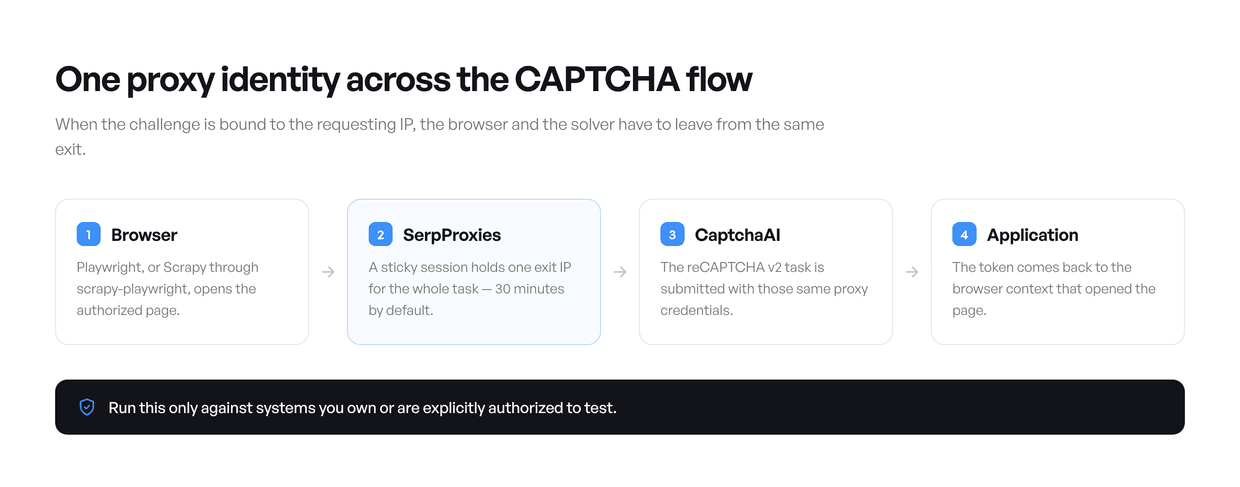
The rule that makes or breaks the integration is session consistency. If the target binds a challenge to the requesting IP, then the browser that loaded the page and the solver that answers the challenge have to leave from the same exit. A browser opens many connections to render one page, so a rotating username can quietly spread a single Playwright flow across several IPs. Sticky is the safer default here.
Authorized use only. Run these examples against sites you own or have explicit written permission to automate. Respect access controls, rate limits, privacy rules and the target's terms.
What each service is doing
SerpProxies routes the browser and the crawler through your chosen product and geography. Rotating sessions for independent requests, sticky sessions for anything that carries state.
CaptchaAI accepts a supported CAPTCHA task, returns a task ID, and hands back the solution when you poll for it. Proxy support on their side is off by default and has to be switched on by their support team.
Playwright loads the page, keeps cookies and browser state, and applies the returned token. Keep one browser context for the whole task.
scrapy-playwright gives a Scrapy spider a real Playwright page inside the normal crawl pipeline. Close every page in both the success and the error path.
Rotating or sticky?
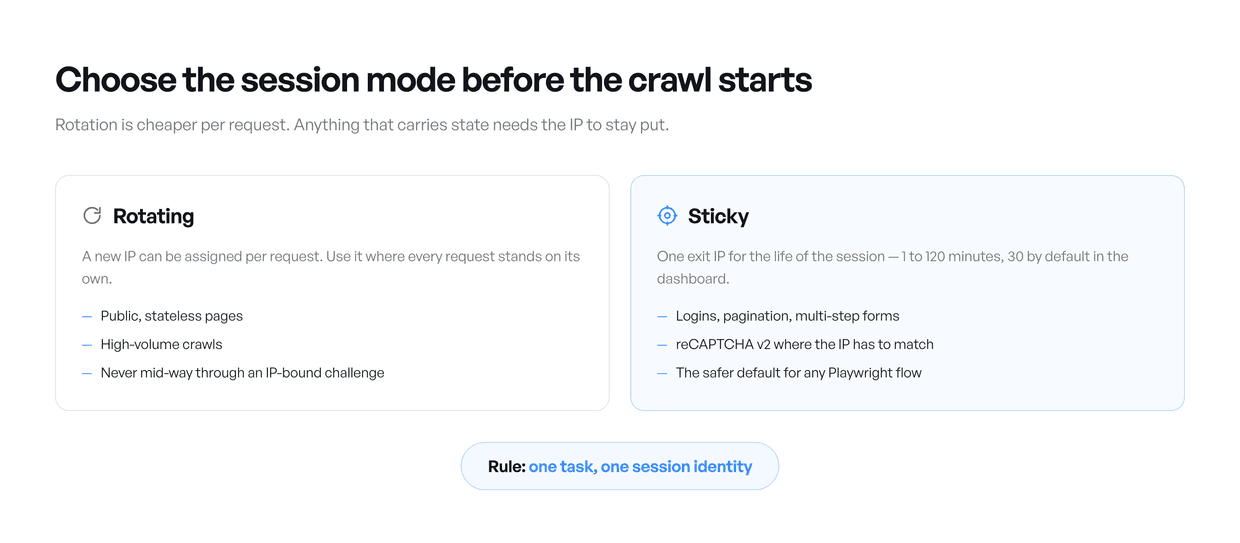
SerpProxies uses a product-specific host and port rather than one shared gateway. Both appear next to the generated credentials in your dashboard. Premium Residential is on premium-residential.serpproxies.com, Datacenter on datacenter.serpproxies.com, and Static ISP gives you a dedicated IP of your own.
For a sticky session the dashboard appends a session ID and a duration to the username, along the lines of -session-<id>-time-<minutes>. The exact shape differs between products, so copy the generated username, password, host and port exactly as exported rather than assembling a suffix by hand.
Independent public pages. Rotating. Every request can take a new IP without breaking anything.
Pagination or an authenticated session. Sticky. Cookies and IP identity stay aligned.
Proxy-aware reCAPTCHA v2. Sticky. The page load and the solve task may need the same exit.
A long-lived fixed identity. Static ISP. The address is dedicated rather than drawn from a pool.
Before you start
A SerpProxies account with an active product and generated credentials.
A CaptchaAI API key with thread capacity available.
Proxy usage enabled on the CaptchaAI account by their support team.
A reCAPTCHA v2 page you own or are explicitly authorized to test, and its correct site key.
Node.js 18+ with Playwright, or Python 3.10+ with Scrapy, scrapy-playwright, Playwright and requests.
Environment variables
CAPTCHAAI_API_KEY: your 32-character CaptchaAI account key.SERP_PROXY_HOST: the product-specific hostname or dedicated IP from the dashboard.SERP_PROXY_PORT: the HTTP port for that product. Chromium ignores credentials on a SOCKS proxy, so a SOCKS port will fail authentication here.SERP_PROXY_USERNAME: the generated rotating or sticky username, copied unchanged.SERP_PROXY_PASSWORD: the proxy password.AUTHORIZED_TEST_URL: the page you own or have permission to test.RECAPTCHA_SITE_KEY: thedata-sitekeyvalue from that exact page.
CaptchaAI's SDKs take a proxy in login:password@host:port form. Use the same host, port, username and password for both the browser and the CaptchaAI task so the two share one exit identity.
One thing worth knowing before you scale this up: on our bandwidth-metered products (Premium, UDP and Private Residential, Mobile, and IPv6 Residential) the page load CaptchaAI performs through your proxy comes out of your GB allowance. On Unlimited Residential, Static ISP and Datacenter it doesn't.
The CaptchaAI request lifecycle
Submit the task to
https://ocr.captchaai.com/in.phpwithkey,method=userrecaptcha,googlekey,pageurl,json=1, and the proxy fields when IP matching is required.Check that the response has
status 1and keep the returned task ID.Wait about 15 seconds before asking for a result.
Poll
https://ocr.captchaai.com/res.phpwithaction=get, the task ID andjson=1.On
CAPCHA_NOT_READY, wait about five seconds and poll again.When
statusis 1, apply the token inside the same browser context that loaded the page.
How you apply the token is application-specific. Some pages read the g-recaptcha-response field; others fire an explicit callback. On a site you own, call the documented callback or submit handler after setting the token. Writing to the textarea alone does not complete every implementation.
Playwright
Install the dependency and the browser:
npm install playwright
npx playwright install chromium
This launches Chromium through SerpProxies, submits a proxy-aware reCAPTCHA v2 task to CaptchaAI, polls with a bounded timeout, and drops the token into the response field. Replace the commented line at the end with whatever your own application does next.
const { chromium } = require('playwright');

const required = [
  'CAPTCHAAI_API_KEY',
  'SERP_PROXY_HOST',
  'SERP_PROXY_PORT',
  'SERP_PROXY_USERNAME',
  'SERP_PROXY_PASSWORD',
  'AUTHORIZED_TEST_URL',
  'RECAPTCHA_SITE_KEY',
];

for (const name of required) {
  if (!process.env[name]) throw new Error(`Missing environment variable: ${name}`);
}

const sleep = (ms) => new Promise((resolve) => setTimeout(resolve, ms));

function proxyEndpoint() {
  return `${process.env.SERP_PROXY_HOST}:${process.env.SERP_PROXY_PORT}`;
}

async function solveRecaptchaV2(pageUrl, siteKey) {
  const submitBody = new URLSearchParams({
    key: process.env.CAPTCHAAI_API_KEY,
    method: 'userrecaptcha',
    googlekey: siteKey,
    pageurl: pageUrl,
    proxy: `${process.env.SERP_PROXY_USERNAME}:${process.env.SERP_PROXY_PASSWORD}@${proxyEndpoint()}`,
    proxytype: 'HTTP',
    json: '1',
  });

  const submit = await fetch('https://ocr.captchaai.com/in.php', {
    method: 'POST',
    headers: { 'content-type': 'application/x-www-form-urlencoded' },
    body: submitBody,
  }).then((response) => response.json());

  if (submit.status !== 1) throw new Error(`CaptchaAI submit error: ${submit.request}`);

  const deadline = Date.now() + 180_000;
  await sleep(15_000);

  while (Date.now() < deadline) {
    const resultUrl = new URL('https://ocr.captchaai.com/res.php');
    resultUrl.search = new URLSearchParams({
      key: process.env.CAPTCHAAI_API_KEY,
      action: 'get',
      id: String(submit.request),
      json: '1',
    });

    const result = await fetch(resultUrl).then((response) => response.json());
    if (result.status === 1) return result.request;
    if (result.request !== 'CAPCHA_NOT_READY') {
      throw new Error(`CaptchaAI result error: ${result.request}`);
    }
    await sleep(5_000);
  }

  throw new Error('CaptchaAI polling timed out after 180 seconds');
}

(async () => {
  const browser = await chromium.launch({
    headless: true,
    proxy: {
      server: `http://${proxyEndpoint()}`,
      username: process.env.SERP_PROXY_USERNAME,
      password: process.env.SERP_PROXY_PASSWORD,
    },
  });

  try {
    const context = await browser.newContext();
    const page = await context.newPage();
    await page.goto(process.env.AUTHORIZED_TEST_URL, {
      waitUntil: 'domcontentloaded',
      timeout: 60_000,
    });

    const token = await solveRecaptchaV2(
      process.env.AUTHORIZED_TEST_URL,
      process.env.RECAPTCHA_SITE_KEY,
    );

    await page.evaluate((solution) => {
      const responseField = document.querySelector(
        'textarea[name="g-recaptcha-response"]',
      );
      if (!responseField) throw new Error('g-recaptcha-response field not found');
      responseField.value = solution;
      responseField.innerHTML = solution;
      responseField.dispatchEvent(new Event('input', { bubbles: true }));
      responseField.dispatchEvent(new Event('change', { bubbles: true }));
    }, token);

    // Trigger the owned application's documented callback or form submission here.
    // Example: await page.locator('#authorized-test-form').evaluate((form) => form.requestSubmit());
  } finally {
    await browser.close();
  }
})().catch((error) => {
  console.error(error);
  process.exitCode = 1;
});
Scrapy, with Playwright
Plain Scrapy will not execute the JavaScript most reCAPTCHA pages need. scrapy-playwright adds a real Playwright page to the request lifecycle:
python -m pip install scrapy scrapy-playwright playwright requests
playwright install chromium
The spider below uses the same proxy credentials for the browser and the CaptchaAI request. The blocking polling helper runs in a worker thread so it never stalls Playwright's asyncio loop.
import asyncio
import os
import time

import requests
import scrapy


def required(name):
    value = os.environ.get(name)
    if not value:
        raise RuntimeError(f"Missing environment variable: {name}")
    return value


def proxy_endpoint():
    return f"{required('SERP_PROXY_HOST')}:{required('SERP_PROXY_PORT')}"


def solve_recaptcha_v2(page_url, site_key):
    submit = requests.post(
        "https://ocr.captchaai.com/in.php",
        data={
            "key": required("CAPTCHAAI_API_KEY"),
            "method": "userrecaptcha",
            "googlekey": site_key,
            "pageurl": page_url,
            "proxy": f"{required('SERP_PROXY_USERNAME')}:{required('SERP_PROXY_PASSWORD')}@{proxy_endpoint()}",
            "proxytype": "HTTP",
            "json": 1,
        },
        timeout=30,
    ).json()
    if submit.get("status") != 1:
        raise RuntimeError(f"CaptchaAI submit error: {submit.get('request')}")

    deadline = time.monotonic() + 180
    time.sleep(15)
    while time.monotonic() < deadline:
        result = requests.get(
            "https://ocr.captchaai.com/res.php",
            params={
                "key": required("CAPTCHAAI_API_KEY"),
                "action": "get",
                "id": submit["request"],
                "json": 1,
            },
            timeout=30,
        ).json()
        if result.get("status") == 1:
            return result["request"]
        if result.get("request") != "CAPCHA_NOT_READY":
            raise RuntimeError(f"CaptchaAI result error: {result.get('request')}")
        time.sleep(5)
    raise TimeoutError("CaptchaAI polling timed out after 180 seconds")


class AuthorizedCaptchaSpider(scrapy.Spider):
    name = "authorized_captcha_test"

    custom_settings = {
        "DOWNLOAD_HANDLERS": {
            "http": "scrapy_playwright.handler.ScrapyPlaywrightDownloadHandler",
            "https": "scrapy_playwright.handler.ScrapyPlaywrightDownloadHandler",
        },
        "TWISTED_REACTOR": "twisted.internet.asyncioreactor.AsyncioSelectorReactor",
        "PLAYWRIGHT_BROWSER_TYPE": "chromium",
        "PLAYWRIGHT_LAUNCH_OPTIONS": {
            "headless": True,
            "proxy": {
                "server": f"http://{proxy_endpoint()}",
                "username": required("SERP_PROXY_USERNAME"),
                "password": required("SERP_PROXY_PASSWORD"),
            },
        },
    }

    def start_requests(self):
        yield scrapy.Request(
            required("AUTHORIZED_TEST_URL"),
            meta={"playwright": True, "playwright_include_page": True},
            callback=self.parse_authorized_page,
            errback=self.close_page_on_error,
        )

    async def parse_authorized_page(self, response):
        page = response.meta["playwright_page"]
        try:
            token = await asyncio.to_thread(
                solve_recaptcha_v2,
                required("AUTHORIZED_TEST_URL"),
                required("RECAPTCHA_SITE_KEY"),
            )
            await page.locator('textarea[name="g-recaptcha-response"]').evaluate(
                """(field, solution) => {
                    field.value = solution;
                    field.innerHTML = solution;
                    field.dispatchEvent(new Event('input', {bubbles: true}));
                    field.dispatchEvent(new Event('change', {bubbles: true}));
                }""",
                token,
            )
            # Trigger the owned application's documented callback or submit action here.
            yield {"url": response.url, "captcha_token_received": True}
        finally:
            await page.close()

    async def close_page_on_error(self, failure):
        page = failure.request.meta.get("playwright_page")
        if page:
            await page.close()
        raise failure.value
Run it once the environment variables are set:
scrapy runspider serp_scrapy.py -O authorized-result.jsonSession handling checklist
Generate the session mode you want in the dashboard and copy the credentials exactly.
Use sticky credentials for the whole browser flow. Ten minutes is a sensible floor; the dashboard defaults to 30 and goes up to 120.
Do not use a rotating username for a Playwright flow: one page opens several connections and can land on several IPs. Do not build a fresh context or rotate the proxy between challenge creation and token use.
One browser context per identity, so cookies and local storage cannot leak between tasks.
Confirm the proxy can reach the page before you pay for a solve.
Keep credentials and API keys in environment variables or a secret manager. Never in source, never in logs.
Keep polling bounded and concurrency inside your CaptchaAI thread capacity.
When it goes wrong
CAPCHA_NOT_READY: still processing. Wait five seconds, poll again.ERROR_BAD_PROXY: the proxy was rejected. Check the endpoint, credentials, session mode and whether the target is reachable; swap the proxy if it stays unhealthy.ERROR_PROXY_CONNECTION_FAILED: CaptchaAI could not load the page through your proxy. Confirm it can reach that URL and that proxy usage is enabled on the account.ERROR_WRONG_SITEKEY: the key is blank, malformed, or from a different page. Takedata-sitekeyfrom the exact page.ERROR_BAD_DOMAIN: the page URL and the site key's domain disagree. Submit the URL the key belongs to.ERROR_ZERO_BALANCE: no balance or no free threads. Top up or reduce concurrency.Token returned but the flow still fails. Usually IP, cookies, user agent, page URL, callback or timing. Keep one sticky context and use the application's documented callback or server-side verification.
Polling timed out. Log the task ID, stop, and look at it before resubmitting.
Taking it to production
Keep stateless crawl queues and identity-bound browser flows apart, so rotating and sticky policies never get mixed by accident.
Log task ID, session identifier, page URL host, attempt count, elapsed time and final status, all redacted.
Never log the API key, the full proxy password, the complete token, or sensitive page content.
Back off exponentially on transient server errors. Fix parameter errors before retrying, and replace an unhealthy proxy rather than hammering it.
Set a deadline. These examples stop at 180 seconds instead of polling forever.
Test callback behaviour on a staging page that mirrors production. A token in a textarea is not a substitute for your normal server-side verification.
Read the target's robots directives, terms, rate limits and data protection requirements before you collect anything.
In short
The two services cover different halves of the same authorized automation stack: the proxy decides network identity, the solver handles the challenge. It works reliably when the session mode is a deliberate choice, credentials stay consistent across both, polling is bounded, and the token is applied through the application's own documented path.
CaptchaAI have put together a dedicated offer for SerpProxies users, with up to 15% off their plans.


